
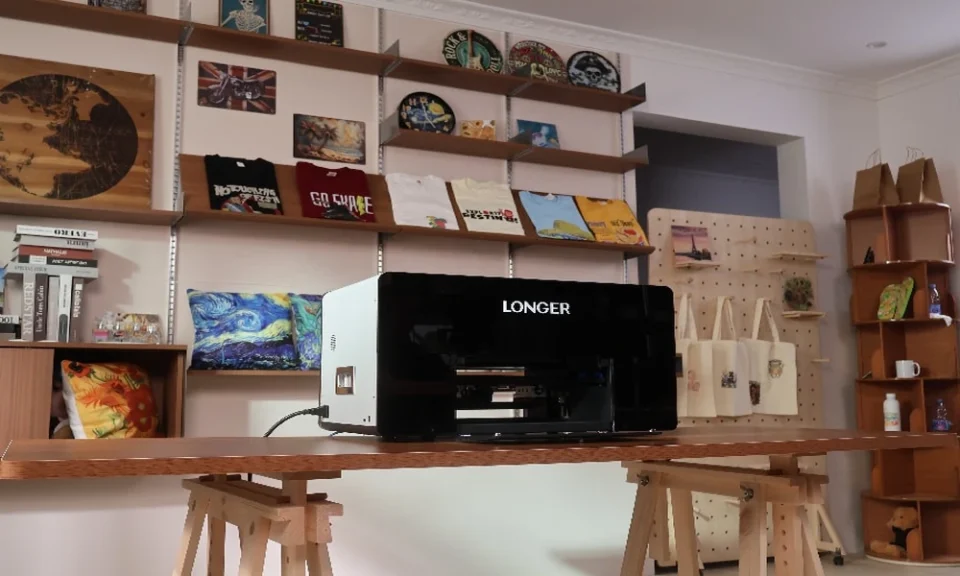
If you run a small business – an Etsy shop, a promo-products side hustle, a sign shop, or a custom-gifts studio – you’ve probably asked yourself this exact question. UV printing lets you print full-color, durable graphics directly onto almost any object: tumblers, phone cases, acrylic, wood, leather, PVC cards, ornaments, and more, without the setup costs of screen printing or the fragility of paper transfers. But “best” depends entirely on your budget, your workspace, and what you plan to print. This guide breaks down exactly how to choose, and which machines are worth your money in 2026.
Why Small Businesses Are Switching to UV Printing
Traditional decoration methods – screen printing, sublimation, vinyl, laser engraving – all have limits. Screen printing needs separate screens per color and isn’t cost-effective for one-off or small-batch orders. Sublimation only works on polyester or specially coated blanks. Vinyl requires cutting, weeding, and pressing.
A desktop UV flatbed printer solves all three problems at once. It cures ink instantly under LED-UV light, so there’s no drying time and no smudging. It prints directly onto rigid and semi-rigid objects in full CMYK plus white ink (for opacity on dark or clear surfaces) and often gloss varnish for texture and spot effects. That means a single machine can fulfill custom orders one at a time – perfect for on-demand small business models where you don’t want to hold inventory of pre-printed stock.
What to Look for Before You Buy
Before comparing specific models, know the five things that actually determine whether a UV printer is right for your business:
- Print area and object height. Check the maximum bed size and the maximum height clearance. If you plan to print on tumblers, bottles, or anything cylindrical, you’ll also need a rotary attachment – confirm it’s available (built-in or optional) before buying.
- White ink and varnish capability. Printing on dark, clear, or non-white substrates requires white ink as a base or highlight layer. Varnish (gloss) ink adds texture, spot-UV effects, and protective coating. Entry-level machines sometimes skip one of these – check carefully.
- Ease of use and software. Some machines include camera-assisted alignment, so you can photograph the object and place your design precisely without measuring by hand – a huge time-saver for beginners doing one-off personalized items. Others use traditional RIP software, which offers more manual control but has a steeper learning curve.
- Footprint and noise. “Desktop” doesn’t always mean small. Some flatbed units still take up a full worktable and require dedicated ventilation. If you’re running this from a spare room or garage, measure twice.
- Total cost of ownership. Sticker price is only part of the equation. Factor in ink cartridge cost, printhead replacement, maintenance solution, and how often the machine needs cleaning cycles to avoid clogs – this can matter more to your margins than the upfront price.
The Best Desktop UV Printer for Small Business: LONGER ePrint
If you weigh all five buying factors above against what’s actually available on the market right now, one machine stands out for small businesses specifically: the LONGER ePrint Dual-Head UV Printer.
Most desktop UV printers force you to choose between affordability and capability. The ePrint is built to remove that trade-off, and it does so with a few genuinely unusual features for a machine in this price class:
World’s first dual-printhead design. Instead of one printhead doing everything, ePrint runs two – together delivering 12 ink channels (CMYK, six white channels, and two varnish channels). In practical terms, this means up to 6x faster output than a typical single-head desktop UV printer, which matters enormously once you’re filling real customer orders instead of just testing designs.
4-in-1 versatility. ePrint isn’t limited to hard-surface UV printing. It also supports UV DTF, DTF, and DTG modes from the same machine, so you can decorate rigid items like phone cases, acrylic, wood, and metal, and also produce transfers for apparel and fabric goods – without buying a second machine as your product line grows.
Standout texture and surface handling. ePrint can build raised, embossed 3D color relief up to 15 mm high, giving your products a tactile, premium finish that flat prints can’t match – ideal for greeting cards, plaques, and gift items customers are willing to pay more for. It also compensates for up to 10 mm of surface height variation, so it holds registration even on uneven or curved objects.
White ink and varnish built in. With six dedicated white channels and two varnish channels, ePrint handles opaque printing on dark or clear substrates and glossy spot-UV effects natively – no separate machine or workaround needed.
Open ink system. Unlike many desktop UV printers that lock you into proprietary cartridges, ePrint’s 12 × 200ml channels accept third-party UV inks, giving small businesses real control over their ongoing operating costs – often the single biggest expense after the machine itself.
Beginner-friendly by design. ePrint pairs with AI-assisted design tools that turn a text description into a print-ready design, plus a simplified workflow aimed at first-time users. It supports 300+ materials out of the box, including acrylic, wood, metal, glass, leather, plastic, packaging, and phone cases, so you can start fulfilling varied orders from day one rather than being boxed into one niche.
Price. ePrint launched with genuinely disruptive pricing for a dual-head, 12-channel UV printer, with the SE (single-head) version starting near $720 and the full dual-head model priced well under half of what comparable flatbed systems from established industrial brands typically cost – making it one of the most accessible ways for a small business to bring UV production in-house without a five-figure investment.
For a small business trying to decide between a barebones entry-level printer that will need replacing in a year, and a full industrial flatbed that ties up tens of thousands of dollars, the LONGER ePrint sits in the sweet spot: professional-grade speed and versatility, at a price and footprint that actually fits a small operation.
Matching the Printer to Your Business Stage
Rather than chasing the single “best” printer, match the machine to where your business actually is:
- Just starting out / testing demand: Choose a compact, camera-assisted, beginner-friendly machine. Lower upfront cost, easier learning curve, and enough capability to fulfill real orders while you validate your product line.
- Established shop, steady orders: Move to a flatbed model with proven white-ink reliability, a bigger bed, and rotary support, since you’ll be printing a wider mix of substrates and shapes.
- High-volume production: Prioritize batch printing area, multi-lamp curing speed, and service/support infrastructure over any single feature – at this stage, downtime costs more than the machine itself.
Final Thoughts
The best desktop UV printer for a small business isn’t necessarily the most expensive or the most industrial-grade – it’s the one that matches your current order volume, your substrate mix, and your workspace, while leaving room to grow. For most people starting out, a compact, easy-to-learn machine with white ink and varnish support is the smartest first purchase: it lets you start taking real custom orders immediately, learn the process hands-on, and reinvest in a bigger flatbed system once demand justifies it. Whichever tier you choose, prioritize models with strong white-ink reliability, available rotary attachments, and manageable maintenance – those three factors do more for your bottom line than raw print speed ever will.
